

The landscape of software development has fundamentally shifted over the past few years, with visual development platforms democratising application creation for non-technical founders. A bubble app creator represents one of the most powerful tools in this revolution, enabling entrepreneurs to transform concepts into functional web applications without writing a single line of code. This approach has proven particularly valuable for startups and businesses seeking to validate ideas quickly, reduce development costs, and maintain full control over their product vision whilst building scalable solutions.
At its core, a bubble app creator functions as a complete visual programming environment where users design, build, and deploy web applications through an intuitive drag-and-drop interface. Unlike traditional development that requires knowledge of multiple programming languages, frameworks, and infrastructure management, this platform consolidates the entire development process into a unified workspace accessible to anyone with determination and logical thinking skills.
The platform operates on a visual logic system where developers create workflows by connecting triggers, conditions, and actions through a graphical interface. This approach mirrors traditional programming logic whilst removing the syntactic barriers that typically prevent non-technical founders from building their own solutions. The official Bubble documentation provides comprehensive guidance on leveraging these capabilities, from basic interface design to complex database operations.
When working with a bubble app creator, developers interact with several fundamental building blocks that form the foundation of any application:
These components work together seamlessly, allowing founders to construct sophisticated applications that would traditionally require months of coding and substantial technical expertise. The visual nature of development means that business logic remains transparent and modifiable, reducing dependency on specialist developers for future iterations.
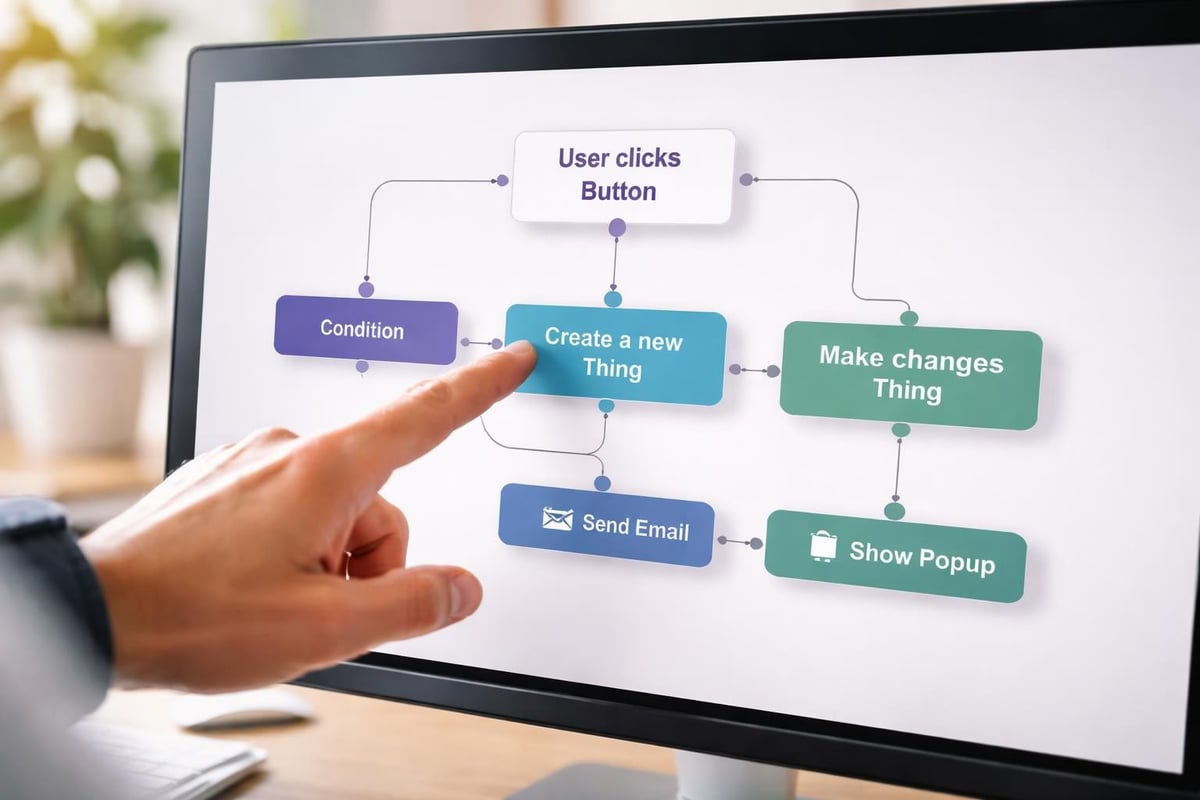
The journey from concept to functional MVP using a bubble app creator follows a predictable pattern that successful founders have refined over thousands of projects. Understanding this workflow dramatically increases the likelihood of creating a viable product that genuinely addresses market needs.
Before touching the platform, founders must crystallise their value proposition and core functionality. This involves identifying the primary user journey, essential features for validation, and the minimal viable feature set required to test market assumptions. Many entrepreneurs make the mistake of attempting to build comprehensive solutions immediately, when proof of concepts require only the essential elements that demonstrate unique value.
During this phase, sketch out your database structure on paper. Define your data types (users, products, orders, etc.), their properties (text fields, numbers, dates), and relationships between them (one-to-many, many-to-many). This upfront planning prevents costly restructuring later when you've already built substantial functionality on flawed foundations.
A bubble app creator provides extensive design flexibility, but this freedom can overwhelm founders without visual design experience. Start by selecting a clear visual hierarchy and consistent spacing system. The platform's responsive engine allows applications to adapt across devices, though this requires thoughtful implementation rather than happening automatically.
| Design Priority | Implementation Approach | Common Pitfall |
|---|---|---|
| Mobile responsiveness | Define breakpoints and test on actual devices | Assuming desktop design scales automatically |
| Visual consistency | Create reusable styles and element templates | Styling each element individually |
| Loading performance | Optimise image sizes and minimise heavy plugins | Adding features without performance testing |
| User flow clarity | Map complete journeys before building | Designing screens in isolation |
The significance of mastering responsive design cannot be overstated, as mobile traffic now constitutes the majority of web usage for most application categories. A bubble app creator provides the tools for responsive development, but developers must apply them strategically throughout their build process.
Once you've grasped fundamental concepts, a bubble app creator reveals its true power through advanced features that rival traditionally coded applications. These capabilities enable founders to build genuinely sophisticated products without assembling development teams or raising significant capital.
The built-in database system supports complex queries, searches, and data manipulation through visual interfaces. Developers can create dynamic lists, implement filtering and sorting, establish privacy rules, and optimise database calls for performance. Understanding how to structure searches efficiently becomes crucial as applications scale beyond initial testing phases.
Privacy rules represent a particularly powerful feature, allowing founders to define precisely which users can view or modify specific data types. This security layer operates at the database level rather than merely hiding interface elements, ensuring genuine data protection that meets commercial application standards.
Modern applications rarely exist in isolation, requiring connections to payment processors, communication services, analytics platforms, and industry-specific tools. A bubble app creator facilitates these connections through its API Connector, which transforms external APIs into native database-like operations within your application.
Implementing third-party API integrations requires understanding authentication methods, request structures, and data transformation. The platform supports REST APIs, GraphQL, and various authentication schemes including OAuth 2.0, making it compatible with virtually any modern web service.
Consider these integration priorities for most startup MVPs:
Each integration extends your application's capabilities whilst maintaining the visual development approach that makes a bubble app creator accessible to non-technical founders.

A common misconception suggests that applications built with a bubble app creator cannot handle significant user loads or complex operations. Whilst the platform does introduce different performance considerations compared to custom-coded solutions, properly architected Bubble applications comfortably support thousands of concurrent users and millions of database records.
Performance optimisation in visual development environments requires understanding how the platform executes operations and renders pages. Each workflow action, database search, and dynamic element adds processing overhead that accumulates across your application. Strategic implementation prevents these individual costs from degrading overall user experience.
Critical optimisation techniques include:
Monitoring application performance becomes essential as user numbers grow. The platform provides built-in analytics showing server capacity usage, allowing founders to anticipate when capacity upgrades become necessary before users experience degraded performance.
As applications gain traction, founders must understand the relationship between usage patterns and infrastructure requirements. A bubble app creator operates on a capacity-based pricing model where applications consume "workload units" based on workflow executions, database operations, and file transfers.
For most MVPs and early-stage products, standard capacity proves entirely sufficient. However, applications with intensive real-time features, complex calculations, or high-frequency database writes may require capacity upgrades sooner. Planning for these costs as part of your growth strategy prevents unpleasant surprises when validation proves successful.
The versatility of a bubble app creator means founders across virtually every industry have successfully built commercially viable products using the platform. Understanding which types of applications suit visual development helps entrepreneurs assess whether this approach aligns with their specific product vision.
Certain application types particularly benefit from no-code development approaches, allowing founders to reach market faster whilst maintaining professional quality standards:
| Application Type | Key Advantages | Example Features |
|---|---|---|
| Marketplaces | Rapid iteration on matching algorithms | User profiles, search filters, messaging, payments |
| SaaS platforms | Quick feature testing and customer feedback loops | User dashboards, data visualisation, workflow automation |
| Internal tools | Business-specific customisation without IT dependency | Custom forms, approval workflows, reporting |
| Community platforms | Flexible content structures and engagement features | User-generated content, moderation, activity feeds |
| Booking systems | Complex scheduling logic without calendar programming | Availability management, notifications, integrations |
These categories share common characteristics: they require sophisticated functionality but don't demand the extreme performance optimisation necessary for real-time gaming, high-frequency trading, or intensive computational tasks. For the vast majority of startup concepts, a bubble app creator provides more than adequate capability whilst dramatically reducing time-to-market.
Numerous successful companies have built their initial products using Bubble before either continuing on the platform or migrating to custom code after achieving product-market fit and securing funding. This approach allows founders to validate assumptions with real users before committing significant resources to traditional development.
MVP Development services specialising in visual development platforms help founders navigate the journey from concept to validated product, ensuring technical decisions align with business objectives whilst avoiding common pitfalls that derail first-time builders.
Mastering a bubble app creator requires commitment and structured learning, but the investment pays dividends through the ability to build, iterate, and maintain your own products indefinitely. The learning curve proves significantly gentler than traditional programming, with most motivated founders building functional prototypes within weeks of starting.
Multiple high-quality learning resources exist for aspiring Bubble developers, ranging from official documentation to community tutorials and structured courses. Beginner-friendly tutorials provide essential foundation knowledge, whilst comprehensive guides cover the complete spectrum from initial concepts to advanced implementations.
The most effective learning approach combines structured tutorials with practical project work. Rather than completing course after course, select a simple but genuine project idea and build it whilst referencing documentation as questions arise. This application-focused learning creates deeper understanding than passive tutorial consumption.
Recommended learning sequence:
This progression builds competency systematically whilst maintaining motivation through visible progress toward your actual product goals.
The Bubble community represents one of the platform's strongest assets, with thousands of active developers sharing knowledge, templates, and solutions. The official forum hosts daily discussions where experienced builders assist newcomers with specific challenges, often providing detailed solutions complete with screenshots and workflow examples.
Beyond official channels, numerous detailed reviews and honest assessments from experienced developers provide realistic perspectives on platform capabilities and limitations. These resources help founders set appropriate expectations and avoid common misconceptions about what visual development can achieve.
Understanding the financial implications of building with a bubble app creator helps founders make informed decisions about development approaches. The economics strongly favour no-code development for MVPs and early-stage products, though specific circumstances may eventually justify migration to custom solutions.
Bubble operates on a tiered subscription model with plans ranging from free development environments to enterprise-grade infrastructure supporting high-traffic applications. The free tier allows unlimited development and testing, with paid plans required only when launching to custom domains with production users.
For most startups, the mid-tier plans costing £23-£99 monthly provide ample capacity for validation and early growth. These costs prove dramatically lower than hiring developers or engaging traditional development agencies, which typically require £10,000-£50,000 minimum investments for comparable functionality.
When evaluating whether a bubble app creator suits your project, consider the total cost of ownership across different development pathways:
The optimal approach depends on your specific circumstances, including available capital, technical background, time sensitivity, and long-term vision. For founders prioritising speed and capital efficiency whilst maintaining product control, visual development platforms offer compelling advantages.
Despite its accessibility, working with a bubble app creator presents distinct challenges that differ from traditional development obstacles. Understanding these friction points and their solutions helps founders navigate the building process more effectively.
Whilst Bubble supports impressive functionality, certain requirements exceed platform capabilities or prove inefficient to implement visually. Complex mathematical calculations, real-time collaborative editing, or intensive data processing may perform better in custom code environments.
However, the platform's plugin system and custom code capabilities allow developers to extend functionality when visual tools prove insufficient. Founders can commission custom plugins for specific requirements or integrate external services handling specialised operations whilst maintaining their core application in Bubble.
Visual development introduces unique debugging challenges since workflows lack the explicit error messages common in traditional coding. The platform's debugger tool helps identify workflow execution issues, showing step-by-step operations and highlighting where processes fail or produce unexpected results.
Systematic debugging approaches prove essential: isolate problematic workflows, verify data exists where expected, confirm privacy rules allow required operations, and check conditional logic for edge cases. Building guides often include troubleshooting sections addressing frequent stumbling blocks for new developers.
Armed with understanding of what a bubble app creator offers, founders face the practical decision of whether to proceed with visual development or pursue alternative approaches. This choice significantly impacts development timeline, costs, and product trajectory.
Consider your specific requirements against platform strengths. If your application centres on user interactions, data management, workflows, and integrations rather than computationally intensive operations or bleeding-edge technologies, Bubble likely provides everything needed for successful validation and growth.
Projects particularly well-suited to visual development include internal business tools, customer portals, marketplaces, SaaS applications, booking platforms, and community sites. Conversely, real-time multiplayer experiences, IoT device management, or cryptocurrency applications may require capabilities beyond current platform scope.
Beginning your journey with a bubble app creator requires more than creating an account and opening the editor. Strategic preparation dramatically improves outcomes:
Pre-build preparation checklist:
This preparation ensures building efforts focus on features genuinely necessary for validation rather than nice-to-have additions that delay launch without improving learning outcomes. The goal remains reaching real users with functional products as quickly as possible, gathering feedback, and iterating based on actual usage rather than assumptions.
Building applications without code has evolved from experimental approach to legitimate development methodology trusted by thousands of successful companies. A bubble app creator empowers founders to validate ideas rapidly, maintain product control, and iterate based on genuine user feedback without the capital requirements traditionally associated with software development. Whether you're exploring your first startup concept or expanding an existing business with digital products, understanding visual development capabilities opens new possibilities for bringing ideas to market. Creator Concepts specialises in helping entrepreneurs transform concepts into award-winning MVPs using Bubble, combining technical expertise with startup experience to ensure your first build achieves its validation objectives efficiently.
© 2026 CreatorConcepts Limited
128 City Road, London EC1V 2NX