

Building a successful digital product requires more than just technical knowledge-it demands strategic thinking, careful planning, and an understanding of what separates functional web applications from truly exceptional ones. Whether you're a startup founder with a groundbreaking idea or an entrepreneur looking to digitize your business processes, learning to make a web application is an invaluable skill in 2026. This comprehensive guide walks you through every critical phase of web application development, from initial concept validation to deployment and beyond.
A web application is fundamentally different from a traditional website. Whilst websites primarily display information, web applications enable users to interact, manipulate data, and perform complex tasks through their browser. Think of tools like Notion, Trello, or Salesforce-these platforms process user inputs, store information, and deliver personalized experiences in real-time.
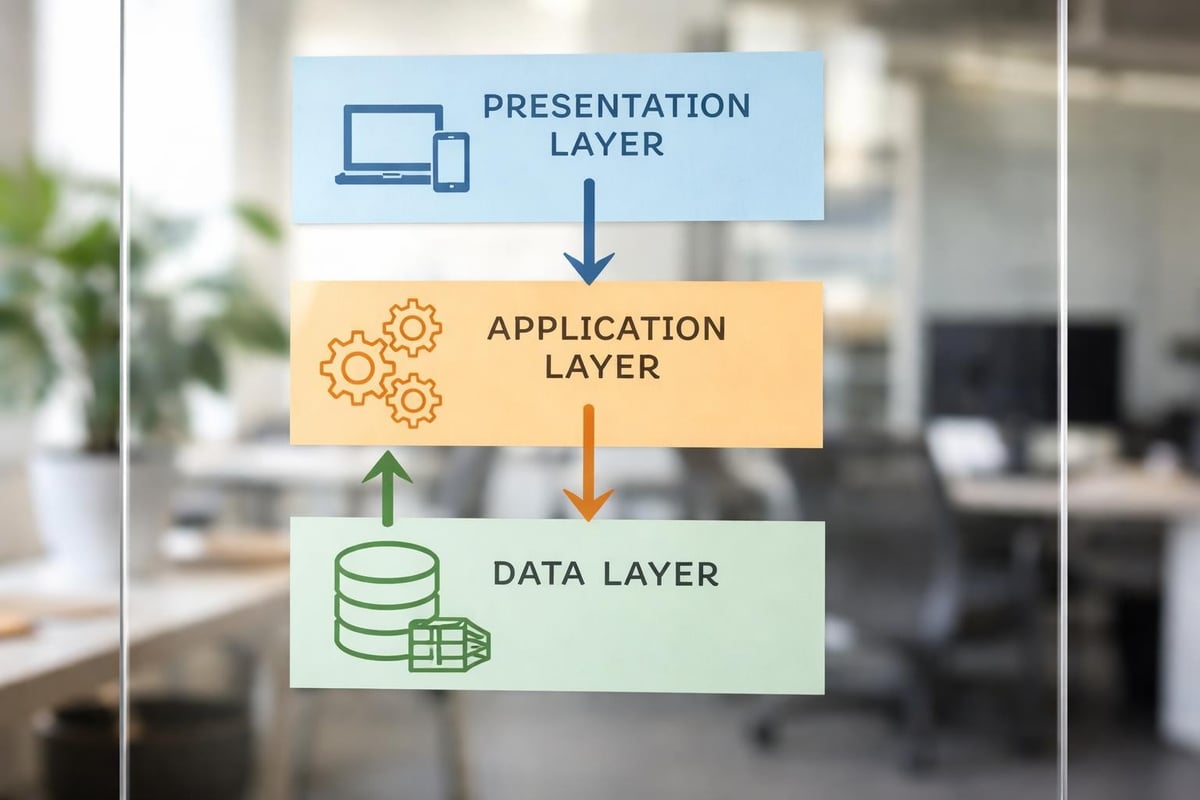
The architecture of modern web applications typically comprises three core layers:
Understanding these architectural components helps you make informed decisions throughout the development process. Each layer requires different technologies, expertise, and optimization strategies to function efficiently together.
Before you make a web application, you need to identify what sets exceptional products apart. Performance stands as a critical factor-users expect pages to load in under three seconds, regardless of device or connection speed. Security cannot be an afterthought; with data breaches costing businesses millions in 2026, implementing robust authentication and authorization from day one is essential.
Scalability determines whether your application can grow with your user base. An application that works beautifully for 100 users but crashes with 10,000 is fundamentally flawed. Consider how your chosen architecture and technologies will handle increased traffic, data volume, and feature complexity over time.
Strategic planning separates successful web applications from abandoned projects. Start by defining your target audience with precision-understanding their pain points, technical proficiency, and usage contexts shapes every subsequent decision. A web application for financial professionals demands different design and functionality than one built for restaurant owners.
Market research validates your concept before you invest significant resources. Analyze competitors, identify gaps in existing solutions, and articulate your unique value proposition clearly. What problem does your application solve better than alternatives? This clarity proves invaluable when making trade-offs during development.
Feature creep kills more projects than technical challenges. When you make a web application, resist the temptation to build everything at once. Instead, identify the minimum viable product (MVP) that delivers core value to users. Prioritize ruthlessly using frameworks like MoSCoW:
This approach enables faster time-to-market and provides real user feedback before investing in less critical functionality. Partnering with specialists who understand MVP development can accelerate this validation process, helping founders launch scalable products in weeks rather than months.
The decision between traditional coding and no-code platforms fundamentally shapes your project timeline, budget, and flexibility. Traditional development using frameworks like React, Angular, or Vue.js offers unlimited customization and control but requires significant technical expertise and development time.
No-code platforms have matured dramatically by 2026, offering sophisticated capabilities previously requiring custom code. These visual development environments enable founders to build, test, and iterate without extensive programming knowledge. For startups focused on speed-to-market and idea validation, no-code web development platforms provide compelling advantages.
| Approach | Time to Market | Cost | Flexibility | Technical Expertise Required |
|---|---|---|---|---|
| Traditional Code | 3-6 months | £30,000-£150,000+ | Unlimited | High (developers needed) |
| No-Code Platforms | 2-8 weeks | £5,000-£30,000 | Moderate to High | Low to Moderate |
| Hybrid Approach | 2-4 months | £15,000-£75,000 | High | Moderate |
Your technology stack encompasses the programming languages, frameworks, databases, and tools that power your application. Front-end choices in 2026 centre around React's ecosystem dominance, Vue.js's simplicity, or Angular's enterprise-grade structure. Each offers distinct advantages depending on your project requirements.
Back-end technologies must align with your team's expertise and application needs. Node.js excels for real-time applications, Python (Django/Flask) offers rapid development, whilst Ruby on Rails maintains popularity for startup MVPs. The database decision-SQL versus NoSQL-depends on your data structure, relationships, and scaling requirements.
Consider adopting best practices for web application development from the outset, as architectural decisions made early prove difficult to reverse later.
User experience (UX) determines whether people embrace or abandon your web application. Begin with user journey mapping-document every step users take to accomplish their goals within your application. Identify friction points, unnecessary steps, and opportunities to streamline processes.
Wireframing transforms abstract concepts into tangible layouts. Low-fidelity wireframes focus on structure and flow without the distraction of visual design. Tools like Figma, Sketch, or Adobe XD enable collaborative wireframing and rapid iteration based on stakeholder feedback.
With mobile devices generating over 60% of web traffic in 2026, responsive design isn't optional-it's essential. Your web application must adapt seamlessly to smartphones, tablets, and desktops whilst maintaining functionality and aesthetics. Mobile-first design approaches often yield superior results, forcing you to prioritize essential features for smaller screens before enhancing for larger displays.
Consider touch interfaces, thumb zones, and reduced bandwidth when designing mobile experiences. Navigation patterns that work beautifully on desktop often fail miserably on mobile-hamburger menus, bottom navigation bars, and gesture-based interactions deserve careful consideration.
Performance optimization becomes critical on mobile networks. Minimize HTTP requests, compress images, implement lazy loading, and leverage browser caching to ensure swift load times even on 4G connections. Progressive web apps offer an exciting middle ground between traditional web applications and native mobile apps.

Development translates designs and specifications into functioning code. Establish a clear development workflow from the outset-agile methodologies with two-week sprints work well for most web application projects. Daily standups, sprint planning, and retrospectives keep teams aligned and responsive to challenges.
Version control using Git remains the industry standard in 2026. Establish branching strategies that prevent conflicts whilst enabling parallel development. Feature branches, develop branches, and protected main branches create structure that scales with team size.
Your database schema forms your application's foundation. Poorly designed databases create performance bottlenecks, data integrity issues, and maintenance nightmares. Normalize data to reduce redundancy, but denormalize strategically when query performance demands it.
Consider these database design principles:
When founders build proof of concepts, they often underestimate database planning. Time invested in thoughtful schema design pays dividends as applications scale.
Security breaches devastate startups-reputation damage, financial losses, and regulatory penalties can prove fatal. When you make a web application, security cannot be retrofitted; it must be embedded throughout the development lifecycle. Understanding web application security best practices provides essential knowledge for protecting user data.
Authentication verifies user identity. Implement multi-factor authentication (MFA) for sensitive applications, use strong password policies, and never store passwords in plain text. Modern authentication protocols like OAuth 2.0 and OpenID Connect provide secure, standardized approaches.
Authentication confirms who users are; authorization determines what they can do. Role-based access control (RBAC) assigns permissions based on user roles-administrators, editors, and viewers each access different functionality. Attribute-based access control (ABAC) offers finer granularity, evaluating multiple user and resource attributes.
Input validation prevents injection attacks that exploit unvalidated user data. Validate all inputs server-side-never trust client-side validation alone. Sanitize data before database insertion, use parameterized queries to prevent SQL injection, and implement content security policies to mitigate cross-site scripting (XSS) attacks.
| Security Measure | Purpose | Implementation Priority |
|---|---|---|
| HTTPS/SSL Certificates | Encrypt data in transit | Critical (Day 1) |
| Input Validation | Prevent injection attacks | Critical (Day 1) |
| Multi-Factor Authentication | Strengthen user authentication | High (Week 2-3) |
| Rate Limiting | Prevent brute force attacks | High (Week 3-4) |
| Security Headers | Protect against common vulnerabilities | Medium (Month 1) |
| Regular Security Audits | Identify emerging vulnerabilities | Ongoing |
Comprehensive testing differentiates professional web applications from amateur projects. Unit tests validate individual functions and components in isolation. Integration tests verify that different modules work correctly together. End-to-end tests simulate real user journeys through your application.
Test automation saves time and improves reliability. Tools like Jest, Cypress, or Selenium enable continuous testing as code changes. Aim for meaningful test coverage-not 100% coverage for its own sake, but thorough testing of critical paths and edge cases.
Performance directly impacts user satisfaction and conversion rates. Load testing reveals how your application behaves under stress. Tools like Apache JMeter or k6 simulate thousands of concurrent users, identifying bottlenecks before they affect real users.
Monitor these key performance indicators:
Optimizing web application performance involves multiple strategies. Minify CSS and JavaScript files, implement CDN delivery for static assets, optimize database queries with proper indexing, and consider caching strategies for frequently accessed data. Following web application development considerations ensures you address performance optimization systematically.

Choosing your hosting environment significantly impacts performance, scalability, and operational costs. Cloud platforms like AWS, Google Cloud, and Microsoft Azure dominate enterprise hosting in 2026, offering auto-scaling, global distribution, and managed services that reduce operational overhead.
Platform-as-a-Service (PaaS) solutions like Heroku, Vercel, or Netlify simplify deployment, automatically handling infrastructure management, scaling, and SSL certificates. These platforms suit startups prioritizing speed-to-market over infrastructure control.
CI/CD pipelines automate the path from code commit to production deployment. When developers push code changes, automated tests run immediately. Passing tests trigger deployment to staging environments for further validation before production release.
Popular CI/CD tools include:
Implementing CI/CD early prevents the chaos of manual deployment processes as teams and codebases grow. The initial setup investment pays dividends through reduced errors, faster releases, and increased developer confidence.
Launching your web application marks the beginning, not the end, of your journey. Implement comprehensive monitoring to understand application health, user behaviour, and potential issues. Application performance monitoring (APM) tools like New Relic, Datadog, or Sentry provide real-time insights into errors, slow transactions, and infrastructure health.
User analytics reveal how people actually use your application-often differently than you anticipated. Google Analytics, Mixpanel, or Amplitude track user journeys, feature adoption, and conversion funnels. This data informs prioritization of new features and optimization efforts.
Scalability ensures your web application grows with your success. Vertical scaling (upgrading server resources) offers simplicity but has limits. Horizontal scaling (adding more servers) provides unlimited growth potential but requires architectural foresight.
Design stateless application servers that don't store session data locally-this enables load balancing across multiple instances. Externalize session storage to Redis or similar in-memory databases. Implement database read replicas to distribute query loads and consider database sharding strategies if you anticipate massive data growth.
When you make a web application with scalability in mind, you avoid costly rewrites as user numbers climb. Exploring resources about SaaS app development provides valuable perspectives on building products that scale efficiently.
Documentation often receives insufficient attention during development, creating technical debt that haunts teams later. Maintain both user-facing documentation explaining features and workflows, and technical documentation detailing architecture, APIs, and deployment procedures.
Code documentation through meaningful comments and clear naming conventions makes maintenance significantly easier. Future developers-including your future self-will appreciate well-documented code when implementing changes or debugging issues months after initial development.
API documentation deserves special attention if your web application exposes APIs for integrations or mobile applications. Tools like Swagger or Postman automatically generate interactive API documentation from your code, keeping documentation synchronized with implementation.
Web accessibility ensures everyone can use your application, regardless of disabilities. Beyond ethical considerations, accessibility compliance is legally required in many jurisdictions under regulations like the UK's Equality Act 2010 and international WCAG 2.1 guidelines.
Implement semantic HTML that screen readers can interpret correctly. Ensure sufficient colour contrast, provide text alternatives for images, and make all functionality accessible via keyboard navigation. Testing with screen readers like NVDA or JAWS reveals accessibility issues invisible to sighted developers.
Following established best practices for developing web applications ensures you build products that serve diverse user populations whilst avoiding potential legal complications.
Your initial release represents a hypothesis about what users need. Real-world usage provides evidence to validate or challenge those assumptions. Implement feedback mechanisms within your application-in-app surveys, feedback forms, or user testing sessions generate qualitative insights beyond what analytics reveal.
Prioritize feedback carefully. Vocal users don't always represent your broader audience. Look for patterns across multiple users and align feedback with your product vision and business objectives. Not every feature request deserves implementation.
The iteration cycle never truly ends. Successful web applications evolve continuously based on user needs, technological advances, and competitive pressures. Plan regular release cycles-whether weekly, fortnightly, or monthly-that deliver incremental improvements whilst maintaining stability.
Building a web application requires strategic planning, thoughtful execution, and continuous refinement. By understanding core architecture, choosing appropriate technologies, implementing robust security, and maintaining focus on user needs, you create products that deliver genuine value whilst supporting business growth. Whether you pursue traditional development or leverage modern no-code approaches, success depends on validating ideas quickly and iterating based on real user feedback. If you're ready to transform your concept into a functioning web application, Creator Concepts specializes in helping founders and startups build award-winning MVPs using Bubble.io, launching scalable products in weeks rather than months.
© 2026 CreatorConcepts Limited
128 City Road, London EC1V 2NX