
Managing a software project successfully requires more than just technical expertise. It demands strategic planning, clear communication, and the ability to adapt to changing requirements whilst maintaining focus on delivering value. For entrepreneurs and startups in 2026, understanding how to navigate the complexities of software development is crucial for turning innovative ideas into viable products. Whether you're building your first minimum viable product or scaling an existing platform, mastering the fundamentals of software project management can mean the difference between success and failure in today's competitive digital landscape.
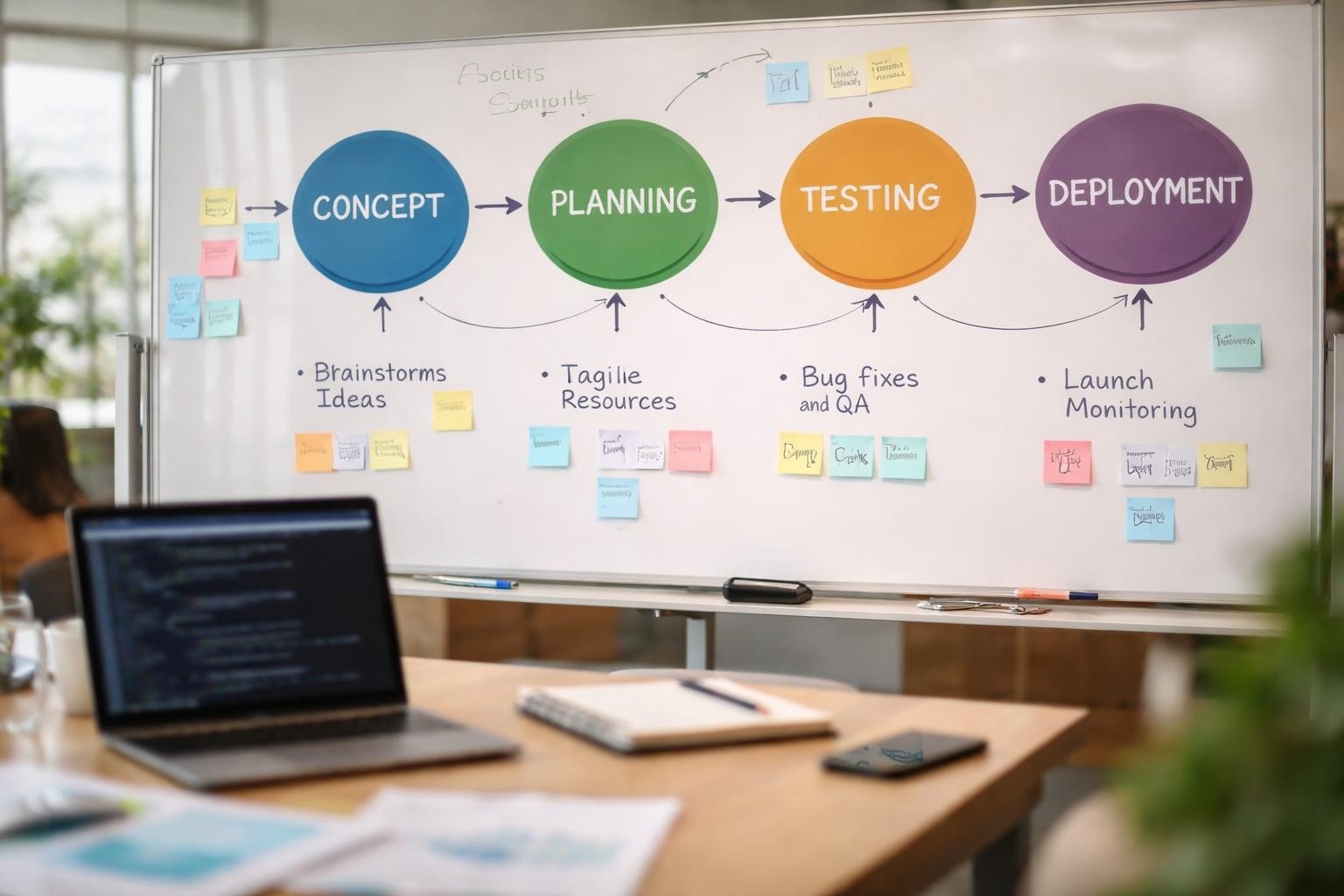
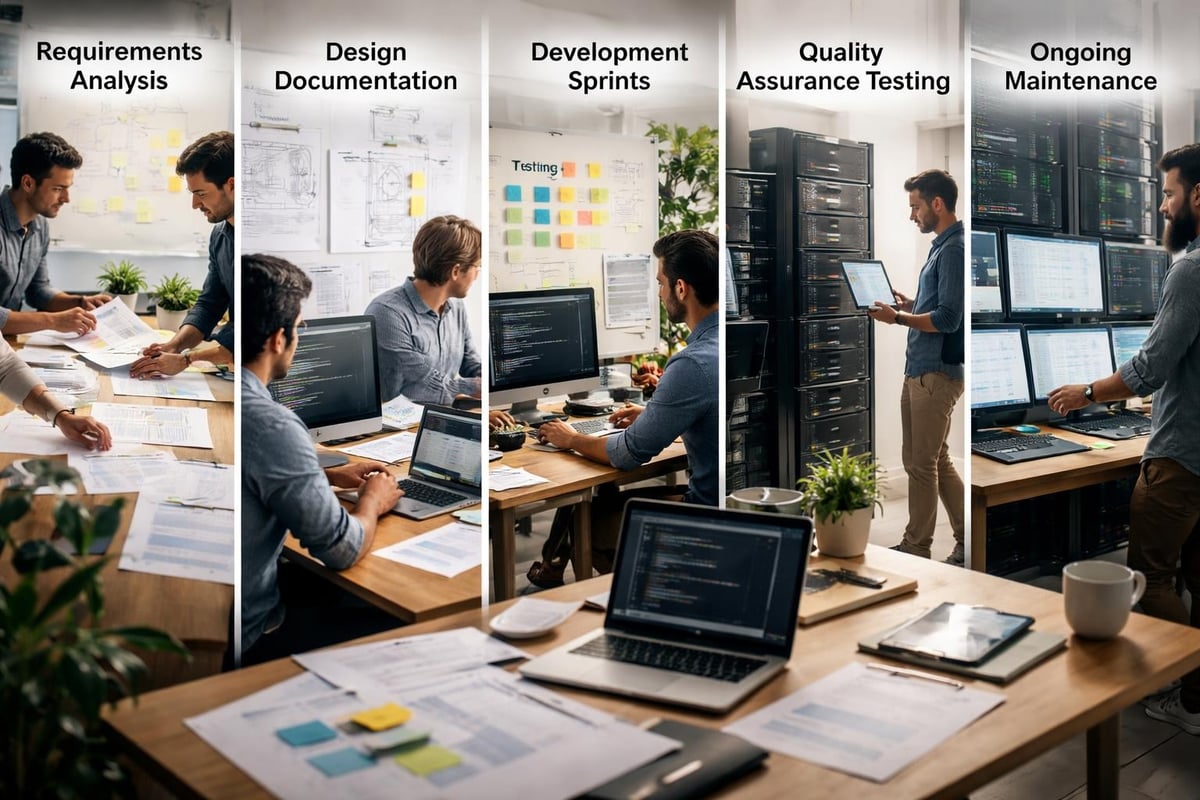
Every software project follows a lifecycle, though the specific approach may vary depending on methodology and business needs. The traditional phases include requirements gathering, design, development, testing, deployment, and maintenance. However, modern approaches have evolved to be more iterative and flexible.
The stages of the Agile SDLC emphasize continuous delivery and customer feedback. Rather than treating each phase as a discrete step, Agile methodologies encourage overlap and iteration, allowing teams to respond quickly to changing market conditions.
Key lifecycle considerations include:
Understanding these phases helps stakeholders set appropriate expectations and allocate resources effectively. A well-structured lifecycle provides a roadmap for the entire team, ensuring everyone understands their role in delivering the final product.
The methodology you select for your software project fundamentally shapes how work gets done. The Waterfall model offers a sequential approach where each phase must complete before the next begins. This works well for projects with fixed requirements and minimal expected changes.
Conversely, Agile frameworks like Scrum prioritize flexibility and rapid iteration. Scrum organizes work into time-boxed sprints, typically lasting two to four weeks, with regular reviews and retrospectives to improve processes continuously.
For startup environments, no-code development platforms offer an alternative approach that accelerates delivery without sacrificing quality. These platforms enable rapid prototyping and iteration, which aligns perfectly with lean startup principles. When considering app development for non-technical founders, understanding these methodological differences becomes even more critical.
| Methodology | Best For | Timeline | Flexibility |
|---|---|---|---|
| Waterfall | Fixed requirements, regulated industries | Longer (6-12+ months) | Low |
| Agile/Scrum | Evolving products, startup MVPs | Shorter cycles (2-4 weeks) | High |
| Kanban | Continuous delivery, maintenance | Ongoing | Very High |
| No-code | Rapid MVP development, validation | Weeks to months | High |
Effective planning establishes the foundation for successful delivery. Start by defining what success looks like for your software project. This includes both business objectives and technical requirements.
Essential planning activities:
The best practices in software project management emphasize the importance of clear communication channels from the outset. Establish how decisions will be made, how progress will be tracked, and how issues will be escalated.
For entrepreneurs working on their first software project, partnering with experienced development teams can accelerate the planning process significantly. Agencies specializing in MVP development help founders validate their ideas using scaleable MVPs designed, built and launched with them in weeks, transforming abstract concepts into concrete products faster than traditional approaches allow.
Scope creep remains one of the most common causes of software project failure. It occurs when requirements expand beyond the original agreement without corresponding adjustments to timeline or budget.
To prevent scope creep, create a detailed requirements document that specifies exactly what the software will and won't do. Use user stories to capture functionality from the end-user perspective. Each story should follow the format: "As a [user type], I want to [action] so that [benefit]."
Prioritize requirements using frameworks like MoSCoW (Must have, Should have, Could have, Won't have). This ensures the team focuses on delivering core value first whilst maintaining clarity about what falls outside the current software project scope.
Regular requirement reviews keep the project aligned with business goals. Schedule these at key milestones to validate that what's being built still matches market needs. In fast-moving startup environments, pivoting quickly based on user feedback can be more valuable than rigidly adhering to outdated specifications.
Your software project's success depends heavily on how well the development team functions. Whether working with in-house developers, agencies, or freelancers, establishing clear communication protocols is essential.
Modern software projects typically involve diverse skill sets working in concert. Common roles include:
For smaller software projects, individuals may wear multiple hats. The key is ensuring accountability for each function, even if one person handles several roles. Clear ownership prevents tasks from falling through gaps.
Remote and distributed teams have become standard in 2026, requiring additional attention to asynchronous communication and documentation. Tools like Slack for messaging, Notion for documentation, and project management platforms keep everyone aligned regardless of location.

Communication breakdowns cause more software project failures than technical challenges. Establish regular touchpoints that keep everyone informed without creating meeting overload.
Effective communication patterns include:
Documentation plays a crucial role in maintaining project continuity. When exploring no-code web development platforms, comprehensive documentation becomes even more valuable as it enables non-technical team members to understand system architecture and make informed decisions.
Transparency builds trust with stakeholders. Share both successes and challenges openly, providing context around delays or pivots. When stakeholders understand the reasoning behind decisions, they're more likely to support the software project through inevitable difficulties.
Selecting appropriate tools can dramatically improve software project outcomes. The best project management software in 2026 offers integrated features for planning, tracking, and collaboration.
| Tool Category | Purpose | Popular Options |
|---|---|---|
| Project Management | Task tracking, timelines | Asana, Monday.com, Jira |
| Communication | Team messaging, video calls | Slack, Microsoft Teams, Zoom |
| Documentation | Knowledge sharing | Notion, Confluence, Google Docs |
| Version Control | Code management | GitHub, GitLab, Bitbucket |
| Design | UI/UX creation | Figma, Sketch, Adobe XD |
Beyond standard project management tools, development-specific platforms enhance productivity. Integrated development environments (IDEs), continuous integration/continuous deployment (CI/CD) pipelines, and automated testing frameworks reduce manual effort and improve quality.
For no-code development, platforms like Bubble.io provide comprehensive environments where design, development, and deployment happen within a single ecosystem. This consolidation reduces tool sprawl and simplifies the development workflow, particularly beneficial for startups with limited technical resources.
What gets measured gets managed. Establish key performance indicators (KPIs) that provide insight into software project health without creating analysis paralysis.
Essential metrics to track:
Visual dashboards make these metrics accessible to all stakeholders. Automated reporting saves time and ensures everyone works from current data. When metrics indicate the software project is trending off-course, immediate corrective action prevents small issues from becoming major problems.
The software release life cycle provides a framework for understanding different maturity stages. Tracking which features are in alpha, beta, or production helps manage stakeholder expectations about stability and completeness.
Every software project faces unexpected challenges. Proactive risk management identifies potential issues before they derail progress.
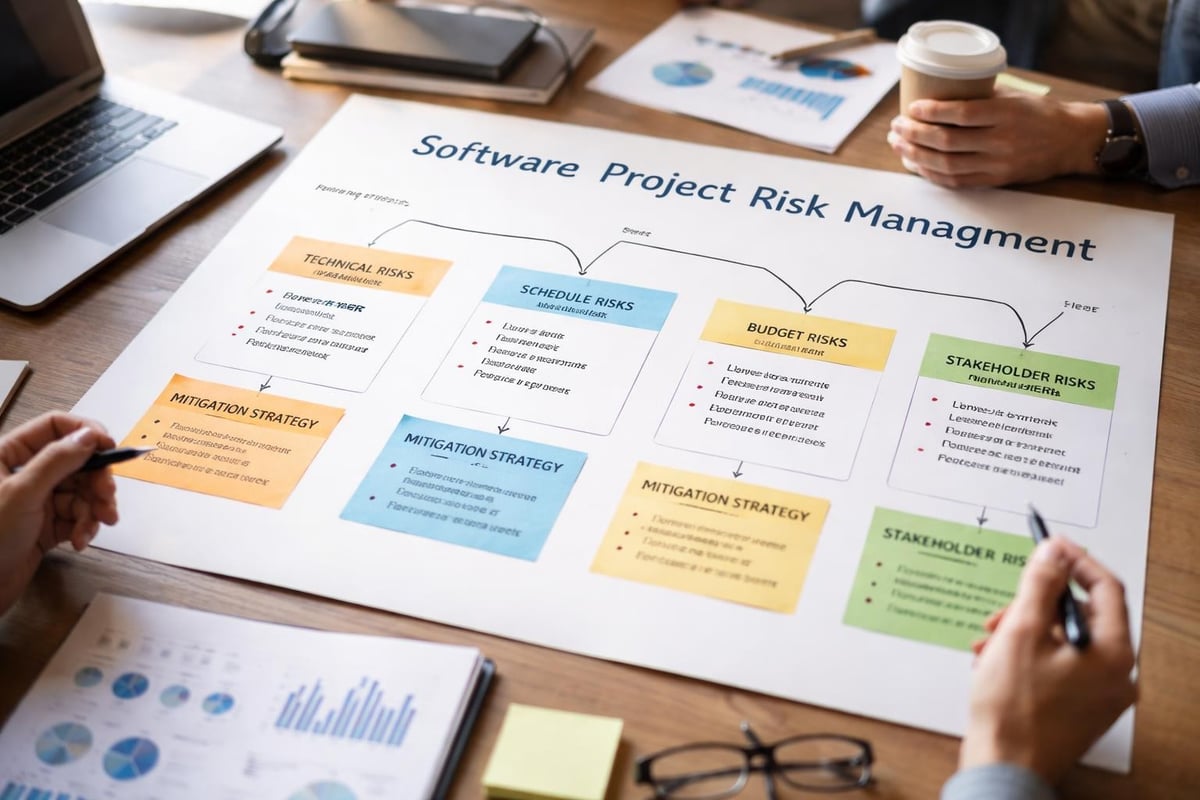
Understanding typical risks helps you prepare appropriate responses. Technical risks include architecture decisions, integration challenges, and performance issues. Non-technical risks encompass scope changes, resource constraints, and stakeholder misalignment.
Create a risk register documenting identified risks, their likelihood, potential impact, and mitigation strategies. Review this regularly, updating probabilities as circumstances change. Some risks dissipate as the software project progresses, whilst others may emerge that weren't initially apparent.
Effective risk mitigation strategies:
When working with external development teams, understanding startup tips specific to software projects can help you ask better questions and make more informed decisions about risk tolerance.
Change is inevitable in software projects, particularly for startups operating in dynamic markets. The question isn't whether requirements will change, but how you'll manage those changes effectively.
Implement a formal change request process that evaluates each proposed modification against impact to timeline, budget, and existing commitments. Not all changes are equally valuable, some may wait for future releases whilst others require immediate attention.
When significant pivots become necessary, communicate transparently with all stakeholders about the reasoning and implications. A well-managed pivot, whilst disruptive short-term, can save a software project from delivering a product the market doesn't want.
The comparison between no-code and traditional development becomes particularly relevant when considering pivot flexibility. No-code platforms typically enable faster iteration, reducing the cost of directional changes compared to custom-coded solutions.
Quality shouldn't be an afterthought bolted onto the end of development. Integrate testing throughout the software project lifecycle to catch issues early when they're cheaper to fix.
Different testing types serve different purposes. Unit tests verify individual components function correctly. Integration tests ensure components work together properly. User acceptance testing confirms the software meets business requirements.
Automated testing provides rapid feedback on code changes, preventing regressions where new features break existing functionality. Manual testing remains valuable for exploratory scenarios and user experience evaluation that's difficult to automate.
Comprehensive testing includes:
For startups, balancing testing thoroughness against speed-to-market creates tension. The SDLC models discussion highlights how different methodologies approach this trade-off, with Agile favouring continuous testing over big-bang release validation.
Technical debt accumulates when short-term solutions create long-term maintenance burdens. Whilst some technical debt is acceptable to meet market windows, excessive debt eventually slows development to a crawl.
Code reviews provide peer oversight that catches issues and shares knowledge across the team. Even informal reviews where developers explain their approach to colleagues can significantly improve quality.
Establishing coding standards creates consistency across the codebase, making it easier for team members to work on different areas. Automated linting tools enforce these standards without requiring manual checking.
When building your software project with Bubble app building approaches, visual development doesn't eliminate the need for quality practices. Logical consistency, proper data modelling, and workflow optimization remain critical for maintainable no-code applications.
Launching your software project marks a significant milestone, but it's not the end of the journey. Successful launches require careful planning to ensure smooth transitions from development to production.
Create a comprehensive launch checklist covering technical, marketing, and operational requirements. Technical preparations include final testing in production-like environments, backup procedures, and rollback plans if critical issues emerge post-launch.
Marketing coordination ensures the market knows about your software project when it becomes available. This might include press releases, social media campaigns, email announcements, and partnerships with influencers or complementary services.
Operational readiness means support systems are prepared for user inquiries. Even the most intuitive software generates questions, having help documentation, FAQs, and support channels ready prevents launch-day chaos.
Launch readiness checklist items:
The seven stages of the SDLC emphasize that deployment is a discrete phase requiring as much attention as design or development. Rushing through deployment to hit arbitrary deadlines often backfires when preventable issues damage user trust.
The first hours and days after launch provide invaluable data about how your software project performs in real-world conditions. Monitor closely for unexpected behaviours, performance bottlenecks, or user experience issues that testing didn't reveal.
Establish feedback channels that make it easy for early users to report problems and suggest improvements. These users are often your most forgiving and valuable source of product insights.
Plan for rapid iteration post-launch. The initial release represents your best hypothesis about what users need, actual usage will reveal gaps and opportunities. Agile methodologies shine during this phase, allowing quick responses to real-world feedback.
When considering different apps to build for your business, remember that each software project type has unique post-launch considerations. SaaS products require ongoing infrastructure management, mobile apps need app store optimization, and internal tools benefit from user training programs.
Financial discipline separates successful software projects from those that consume resources without delivering value. Establish clear budgets that account for all project phases, including post-launch support often overlooked in initial estimates.
Software project costs extend beyond developer salaries. Infrastructure, tools, licenses, marketing, legal compliance, and contingency reserves all consume budget. Underestimating any category creates pressure that compromises quality or timeline.
| Cost Category | Typical % of Budget | Considerations |
|---|---|---|
| Development | 50-60% | Team salaries, contractor fees |
| Infrastructure | 10-15% | Hosting, databases, third-party services |
| Tools & Licenses | 5-10% | Development tools, project management software |
| Testing & QA | 10-15% | Testing tools, QA resources |
| Marketing | 10-15% | Launch activities, user acquisition |
| Contingency | 10-20% | Unexpected issues, scope adjustments |
Track actual spending against budget regularly, addressing variances before they become crises. Software projects frequently encounter unexpected costs, the contingency buffer provides flexibility without requiring constant budget renegotiation.
For startups with limited capital, choosing efficient development approaches maximizes runway. Understanding the differences between web apps and mobile apps helps optimize where to invest limited resources for maximum market impact.
Every software project should deliver measurable business value. Define success metrics before development begins, ensuring the team understands what outcomes matter most.
Return on investment (ROI) for software projects might include revenue generation, cost reduction, improved customer satisfaction, or market positioning. Quantify these benefits where possible, making it easier to justify continued investment or demonstrate success to stakeholders.
Prioritize features based on value delivery rather than technical complexity or personal preferences. The features that drive the most user engagement or solve the most painful problems deserve development priority, even if less exciting technically.
Successfully managing a software project in 2026 requires balancing technical excellence with business pragmatism, adapting methodologies to your specific context whilst maintaining focus on delivering genuine value. Whether you're launching your first MVP or scaling an established platform, these principles provide a foundation for navigating the complexities of modern software development. If you're ready to transform your vision into a validated product, Creator Concepts specializes in helping entrepreneurs and startups build award-winning MVPs using no-code solutions that bring ideas to market in weeks, not months.
© 2026 CreatorConcepts Limited
128 City Road, London EC1V 2NX