

Modern businesses face a critical decision when delivering digital experiences to their audiences: should they build standalone applications or embed app functionality directly into their websites? The integration of an app on website platforms has transformed how startups and established companies approach user engagement, combining the accessibility of web browsing with the rich functionality traditionally reserved for native applications. For entrepreneurs and founders seeking to validate ideas quickly, understanding how to effectively deploy an app on website infrastructure can accelerate time-to-market whilst maintaining exceptional user experiences.
The concept of an app on website integration has evolved significantly beyond simple embedded widgets or basic web forms. Today's sophisticated implementations blur the boundaries between traditional websites and full-featured applications, creating seamless experiences that users access through their browsers without downloads or installations.
This approach offers distinct advantages for startups operating with limited resources and tight timelines. Rather than maintaining separate codebases for iOS, Android, and web platforms, businesses can deploy a single progressive web application that functions across all devices.
Resource efficiency stands at the forefront of advantages. When you build an app on website architecture, your development team focuses on one codebase, dramatically reducing both initial development costs and ongoing maintenance expenses. This proves particularly valuable for pre-revenue startups where every pound matters.
Instant updates represent another compelling benefit. Unlike native applications requiring app store approval processes that can take days or weeks, changes to an app on website deploy immediately. Fix a critical bug at midnight, and users accessing your platform moments later automatically receive the correction.
The user acquisition advantages cannot be overstated. When potential customers discover your product through search engines, social media, or advertising, they can begin using your app on website immediately. No redirection to app stores, no storage space concerns, no compatibility worries.
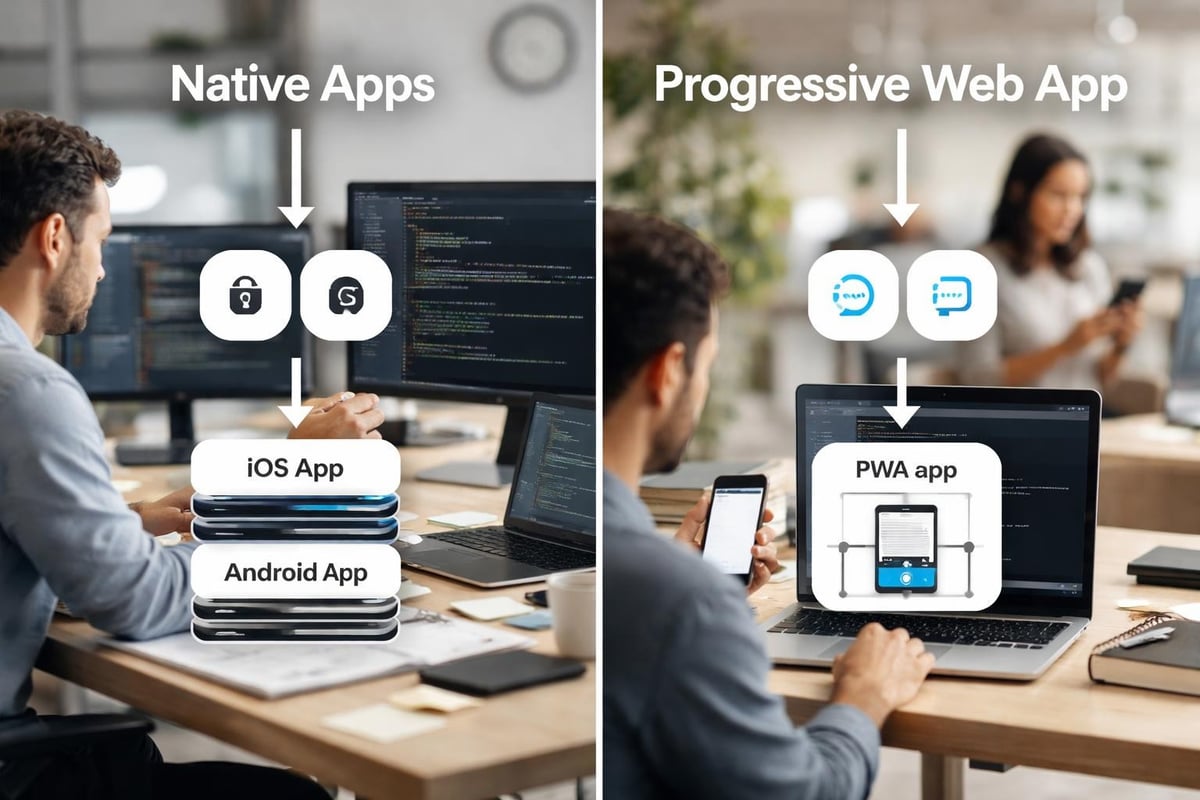
Implementing an app on website requires careful consideration of several technical frameworks and methodologies. Your choice depends on specific project requirements, target audience characteristics, and long-term scalability goals.
Progressive Web Applications represent the gold standard for modern app on website deployment. These sophisticated implementations combine the reach of websites with the functionality of native applications, offering offline capabilities, push notifications, and home screen installation.
| Feature | PWA | Traditional Website | Native App |
|---|---|---|---|
| Offline functionality | Full support | Limited | Full support |
| Installation required | Optional | No | Yes |
| App store approval | Not required | Not applicable | Required |
| Update deployment | Instant | Instant | Delayed |
| Development cost | Medium | Low | High |
Leading companies have demonstrated remarkable success with PWAs. According to case studies from successful implementations, businesses have witnessed conversion increases of 50-150% after deploying PWA versions of their platforms.
For founders considering no-code web development platforms, modern tools like Bubble.io enable rapid PWA development without extensive programming knowledge. This democratises access to sophisticated app on website functionality for non-technical entrepreneurs.
Single Page Applications offer another robust approach to creating an app on website. These frameworks load a single HTML page and dynamically update content as users interact with the application, creating fluid experiences reminiscent of desktop software.
Popular SPA frameworks include React, Vue.js, and Angular, each offering unique advantages for different project types. The key characteristic distinguishing SPAs from traditional multi-page websites lies in their ability to deliver app-like responsiveness without full page reloads.
Performance considerations matter enormously when building SPAs. Initial load times may exceed traditional websites due to larger JavaScript bundles, but subsequent interactions feel instantaneous. Implementing code splitting, lazy loading, and efficient caching strategies mitigates these concerns.
Creating an effective app on website experience demands thoughtful attention to user interface design, responsive layouts, and performance optimisation. The best implementations feel natural on both desktop computers and mobile devices, adapting seamlessly to different screen sizes and input methods.
Given that mobile devices generate over 60% of web traffic in 2026, adopting a mobile-first approach when designing your app on website proves essential. This methodology involves designing for the smallest screens first, then progressively enhancing experiences for larger displays.
Best practices for mobile websites emphasise several critical elements:
The principles of mastering responsive design apply regardless of your chosen development platform. Breakpoints should align with actual device usage patterns rather than arbitrary pixel measurements, and testing across real devices remains irreplaceable.
Users abandon websites that take longer than three seconds to load. When you deploy an app on website, performance becomes even more critical as users expect application-like responsiveness.
Image optimisation represents low-hanging fruit for most projects. Implementing modern formats like WebP, using appropriate compression levels, and serving correctly sized images for different viewports can reduce page weight by 40-60%.
Code splitting allows your app on website to load only the JavaScript necessary for the current view, deferring additional code until needed. This dramatically improves initial load times whilst maintaining full functionality once users engage with your platform.

Deploying an app on website introduces security considerations distinct from both traditional websites and native applications. Your implementation must protect user data, prevent unauthorised access, and maintain compliance with relevant regulations like GDPR.
Robust authentication systems form the foundation of secure app on website platforms. Modern approaches favour token-based authentication using JSON Web Tokens (JWTs) rather than traditional session cookies, offering better security for single-page applications and mobile-optimised experiences.
Multi-factor authentication (MFA) has transitioned from optional security enhancement to essential requirement for any app on website handling sensitive user data. Implementing MFA through authenticator applications, SMS codes, or biometric verification significantly reduces account compromise risks.
| Security Measure | Priority Level | Implementation Complexity |
|---|---|---|
| HTTPS encryption | Critical | Low |
| Multi-factor authentication | High | Medium |
| Input validation | Critical | Medium |
| Rate limiting | High | Low |
| Content Security Policy | Medium | Medium |
| Regular security audits | High | High |
Following best practices from Android Developers regarding secure web application development provides valuable guidance even for non-Android-specific implementations. Principles around secure data transmission, input validation, and permission models apply universally.
When building an app on website that collects user information, implementing comprehensive data protection measures isn't optional. European GDPR requirements extend to any business serving EU users, regardless of company location.
Encryption at rest and in transit protects sensitive data from unauthorised access. SSL/TLS certificates secure data transmission between users' browsers and your servers, whilst database-level encryption safeguards stored information.
Transparent privacy policies clearly explaining what data you collect, how you use it, and users' rights regarding their information build trust whilst ensuring regulatory compliance. For startups exploring app business models, privacy-conscious practices increasingly serve as competitive differentiators.
The technical excellence of your app on website implementation means little if users don't engage with your platform. Thoughtful UX design, intuitive navigation, and strategic engagement mechanisms determine whether visitors become active users.
First impressions matter enormously. When users arrive at your app on website, the initial experience determines whether they explore further or bounce immediately. Effective onboarding balances providing necessary context with respecting users' time and attention.
Progressive disclosure reveals complexity gradually rather than overwhelming new users with every feature simultaneously. Start with core functionality, then introduce advanced capabilities as users demonstrate engagement and competency.
When developing MVPs for startups, focusing onboarding on the single most valuable user action often proves more effective than attempting to showcase every planned feature. Users can discover additional capabilities once they've experienced initial value.
One historical advantage native applications held over websites involved push notifications enabling direct user communication. Modern PWA capabilities have largely eliminated this distinction, allowing app on website implementations to send notifications exactly like native applications.
Strategic notification deployment requires restraint. Bombarding users with excessive notifications leads to either notification disabling or complete app abandonment. Segment your audience and personalise notifications based on actual user behaviour and preferences.

Launching your app on website represents the beginning rather than the conclusion of your development journey. Systematic measurement, analysis, and iteration based on actual user behaviour separates successful platforms from abandoned experiments.
Understanding how users interact with your app on website requires more sophisticated tracking than simple page view counts. Event-based analytics capture specific user actions, revealing which features generate engagement and where users encounter friction.
Key metrics for web applications include:
Modern analytics platforms like Mixpanel, Amplitude, and Heap specialise in event-based tracking for web applications, offering deeper insights than traditional page-view-focused tools like Google Analytics alone.
The instant deployment capability of an app on website enables rapid experimentation impossible with native applications. Deploy variant experiences to different user segments, measure results, and implement winning variations without lengthy approval processes.
Systematic testing methodology prevents random changes that might accidentally harm key metrics. Establish hypotheses before tests, ensure statistical significance before declaring winners, and document learnings for future reference.
Insights from web application development best practices emphasise testing one variable at a time when possible, maintaining consistent measurement across experiments, and balancing optimisation with innovation.
As your user base grows, the app on website architecture that served your initial launch may require evolution. Planning for scale from the outset, even whilst building an MVP, prevents painful migrations later.
Database optimisation becomes critical as data volumes increase. Implementing appropriate indexes, denormalising strategically, and caching frequently accessed data maintains performance as your user base expands.
Horizontal scaling, where you add more servers rather than making existing servers more powerful, typically offers better value and resilience for growing app on website platforms. Load balancers distribute incoming traffic across multiple application servers, preventing any single point of failure.
| Scaling Strategy | Best For | Complexity | Cost Efficiency |
|---|---|---|---|
| Vertical scaling (bigger servers) | Initial growth | Low | Decreasing returns |
| Horizontal scaling (more servers) | Sustained growth | Medium | High |
| Serverless architecture | Variable traffic | Medium | Very high |
| Microservices | Complex applications | High | Depends on implementation |
When considering building scalable MVPs, selecting infrastructure that can grow with your business whilst maintaining cost efficiency during early stages requires careful balance.
Well-designed APIs enable your app on website to integrate with other platforms, expanding functionality without building everything internally. RESTful APIs following established conventions simplify both internal development and potential future integrations with partners.
Rate limiting and authentication for your APIs protect against abuse whilst enabling legitimate use. Implementing API versioning from the beginning prevents breaking changes from disrupting existing integrations as your platform evolves.
Choosing the right development approach for your app on website significantly impacts both initial time-to-market and long-term flexibility. Options span from traditional coded development to modern no-code platforms, each offering distinct trade-offs.
No-code platforms have matured dramatically, now offering capabilities that previously required extensive programming. For non-technical founders, these tools democratise access to sophisticated app on website functionality.
Bubble.io stands out for complex web application development, offering visual programming that translates to actual database structures, workflows, and responsive designs. Startups working with agencies specialising in MVP development can launch sophisticated platforms in weeks rather than months.
When evaluating no-code app makers, consider not just initial development speed but long-term scalability, customisation flexibility, and data ownership. The best no-code platforms offer APIs and database access enabling gradual migration to custom code if needed.
For projects requiring extensive customisation, complex business logic, or integration with existing systems, traditional coded development may prove more appropriate. Modern frameworks streamline development whilst maintaining flexibility.
React dominates for building sophisticated single-page applications, offering component reusability and a massive ecosystem of libraries. Vue.js provides a gentler learning curve whilst maintaining powerful capabilities. Angular suits large enterprise applications requiring extensive structure and type safety.
Guidance from TechRadar on building business websites emphasises selecting platforms aligned with your team's expertise and project requirements rather than chasing the latest trends.
Launching your app on website marks a beginning rather than an ending. Sustained success requires ongoing maintenance, regular updates, and continuous alignment with evolving user needs.
Unlike native applications where users control update timing, app on website platforms deliver changes immediately upon deployment. This power demands responsibility through rigorous testing and staged rollouts.
Implementing proper version control using systems like Git enables tracking changes, reverting problematic updates, and maintaining development, staging, and production environments. Never deploy directly to production without thorough testing in staging environments mirroring production configurations.
Systematic collection and analysis of user feedback informs which features merit development resources and which requests, despite seeming valuable, don't align with core product vision.
Feature prioritisation frameworks like RICE (Reach, Impact, Confidence, Effort) help evaluate potential developments objectively. Calculate expected reach (how many users benefit), impact (how much it improves their experience), confidence (how certain you are about estimates), and required effort (development time and complexity).
Understanding what users truly value rather than what they claim to want requires analysing behaviour alongside feedback. Users might request features they'd rarely use whilst struggling with existing functionality they haven't mastered.
Integrating an app on website offers startups and entrepreneurs a powerful approach to delivering sophisticated digital experiences without the complexity and cost of native application development. By focusing on progressive web technologies, prioritising user experience, and building with scalability in mind, founders can validate ideas rapidly whilst maintaining the flexibility to evolve as their businesses grow. Whether you're exploring no-code solutions or traditional development approaches, the principles outlined above provide a foundation for successful implementation. Creator Concepts partners with ambitious founders to transform ideas into award-winning MVPs, leveraging our Bubble.io expertise to launch sophisticated web applications in weeks rather than months.
© 2026 CreatorConcepts Limited
128 City Road, London EC1V 2NX